English
 Arabic
 French
 Spanish
 Portuguese
 Deutsch
 Turkish
 Dutch
Dutch
 Italiano
 Russian
 Romaian
 Portuguese (Brazil)
 Greek
Greek
Consumer Electronics Market Evolution Driven By Digital Transformation
Gardening |
2026-06-16 15:55:00
 Social Networth OS
 Creator Commerce
 Launch Startup
 Global News
 Creator Award
 Talkfever App
Mostra tutti i risultati
Talkfever App
Mostra tutti i risultati

Passa a Pro
A sales campaign brings traffic. That’s the goal, but traffic without a well-prepared store is just a larger audience watching a slow page load. The weeks before a major campaign are the best opportunity to deal with the technical debt and performance issues that normal operations tend to accumulate.
Preparation separates stores that turn seasonal traffic into revenue from those that attract clicks but lose customers before a product ever makes it into a cart. To properly optimize Shopify website performance ahead of a campaign launch means looking at every layer of the experience, from how fast the first page loads to how smoothly a visitor moves from product to checkout.
Campaign traffic behaves differently from regular traffic. Visitors arriving through paid ads or promotional emails have high intent and low patience, they expect the experience to match the urgency of the offer.
A store that loads in four seconds under normal conditions can experience slower response times or reduced responsiveness during a traffic surge if its apps, scripts, or other resources aren't prepared to handle the increased demand. The pages visitors land on first, whether that is a sale landing page, a collection, or a product, carry the entire first impression.
Deloitte found that a 0.1-second improvement in mobile site speed was associated with an 8.4% increase in retail conversions. On a campaign where thousands of visitors are arriving in a short window, that kind of margin is not marginal at all.
Not everything on a Shopify store needs attention, but the pages and features that campaign traffic will actually hit need to be in the best possible shape.
Campaign performance lives or dies on how well key pages handle pressure. Product pages and dedicated sale landing pages are where most campaign traffic lands, and they tend to carry the most accumulated weight.
Every Shopify product page that loads a custom review widget, a size guide app, a recently viewed carousel, and a live chat tool can end up carrying several additional scripts, adding more work before the visitor can fully interact with the page. That creates Interaction to Next Paint (INP) issues, clicks and taps on the page feel sluggish, and add-to-cart actions lag noticeably.
Deferring non-critical scripts on these pages, auditing which apps actually need to load above the fold, and ensuring product images are served at the right resolution rather than full size are all high-impact fixes that take effect immediately.
Countdown timers, flash sale banners, loyalty pop-ups, and promotional bars are campaign staples. Each one involves a third-party script that fires on page load.
It is common to add four or five campaign-specific apps in the days before a sale, without fully accounting for what they add to load time. The result is a product page that was already carrying background weight and now has to handle additional promotional scripts on top of it.
Running a performance check after each new campaign app is installed, rather than doing one final check before launch, catches these issues while they are still easy to isolate and fix.
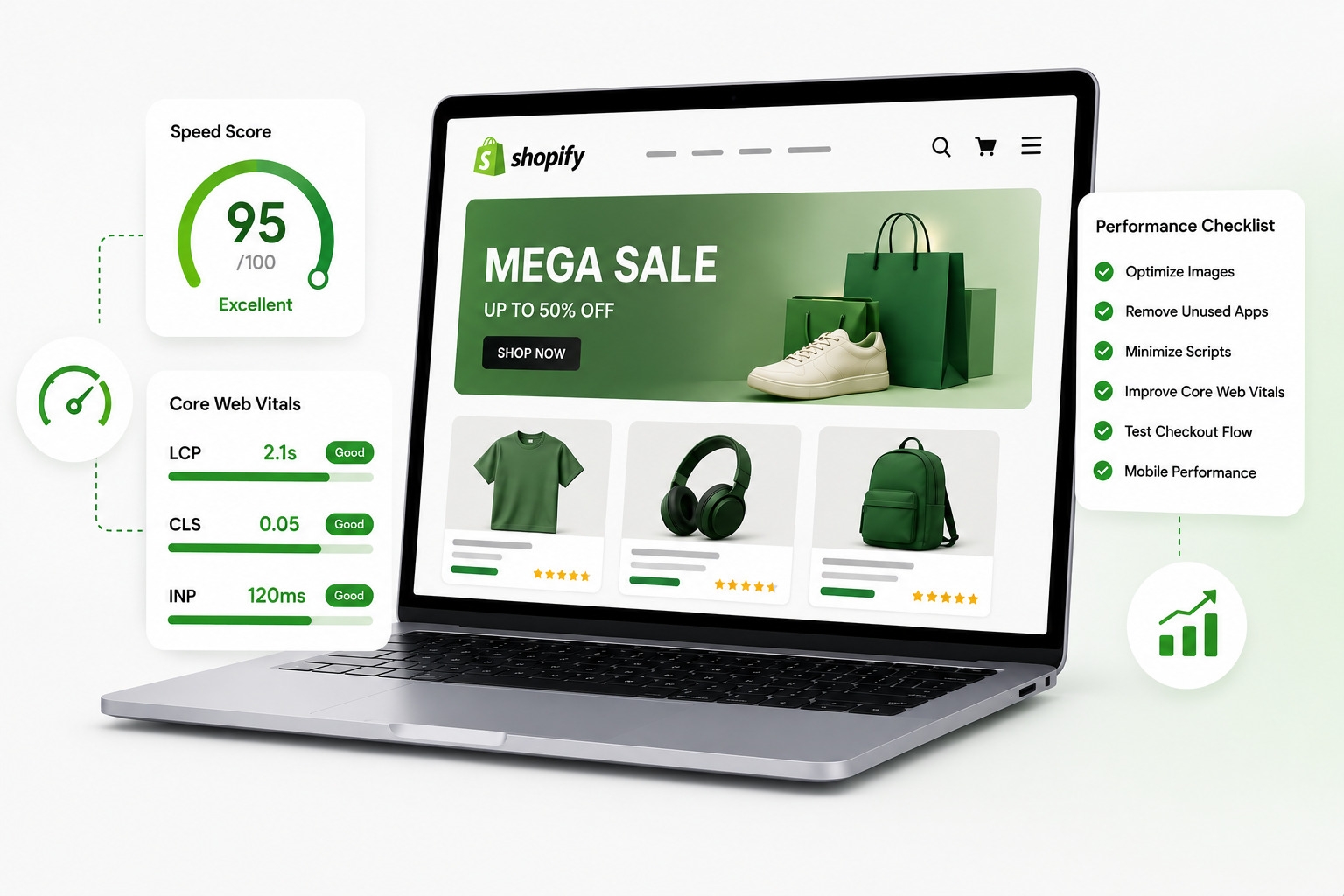
To properly optimize Shopify website performance, the focus should extend beyond load time to the full set of Core Web Vitals metrics that measure loading performance, responsiveness, and visual stability.
Largest Contentful Paint (LCP) measures how quickly the primary content on a page becomes visible. For a sale landing page with a bold hero image and a promotional headline, a poor LCP score means that the main content takes longer to become visible, which can delay when a visitor sees the offer and decides whether to stay or leave.
Cumulative Layout Shift (CLS) causes buttons and text to jump as the page settles after loading. On a sale page where the "Shop Now" button shifts position after a promotional banner loads in, a visitor may misclick or find the page more difficult to use.
These are not abstract technical metrics during a campaign, they are real friction points that affect whether a visitor converts or leaves.
Getting someone to the cart is progress. Keeping them through checkout is where campaign economics are actually decided.
Cart abandonment typically sits around 70% across ecommerce. During a high-traffic campaign, checkout performance is another factor worth monitoring because friction at this stage occurs when purchase intent is highest.
Slow cart drawer animations, delayed quantity updates, and redirects that take more than a second to resolve all introduce friction at the point where purchase intent is highest. Shopify's native checkout is robust, but the experience leading into it, including the cart page, upsell pop-ups, and free-shipping progress bars, should be audited and tested before campaign day.
Pre-campaign technical work that tends to produce the clearest results includes auditing installed Shopify apps and removing any that are no longer active, consolidating tracking pixels where possible to reduce the number of scripts firing on each page, and ensuring that all promotional images are compressed and appropriately sized before they go live.
Running a Google PageSpeed Insights check on every key campaign page after making these changes provides useful lab data and, where available, real-user field data to assess performance.
To improve conversion rate during a campaign, the store needs to be fast, stable, and frictionless well before the first ad goes live. Speed issues discovered at launch cannot be fixed during peak traffic without risking downtime or inconsistent experiences.
For continuous performance monitoring rather than point-in-time audits, a dedicated Shopify speed tool that tracks Core Web Vitals across key pages and flags regressions as they happen gives the most reliable safety net going into a high-traffic window.
At least two to three weeks before launch. That window allows time to test changes, identify regressions from campaign app installs, and confirm performance across mobile and desktop.
Yes, directly. Slower pages see higher bounce rates and lower add-to-cart rates. During paid campaigns where every click has a cost, speed improvements directly reduce wasted ad spend.
The sale landing page, key product pages, the cart, and any collection pages that campaign ads point to. These are the pages under the most traffic and the most pressure to convert.
Yes. Countdown timers, promotional banners, and pop-up apps each add JavaScript that fires on page load. Installing several at once without performance checks can noticeably increase load time.